mirror of
https://github.com/kodjodevf/mangayomi-extensions.git
synced 2026-02-14 02:41:39 +00:00

206 lines
7.7 KiB
Markdown
206 lines
7.7 KiB
Markdown
# Contributing
|
|
|
|
This guide have some instructions and tips on how to create a new Mangayomi extension on js extension.
|
|
|
|
## Prerequisites
|
|
|
|
Before starting please have installed the recent desktop version of the mangayomi application preferably or if you want with a tablet too.
|
|
|
|
|
|
### Writing your extension
|
|
1. Open the app.
|
|
2. Go to extension tab :
|
|
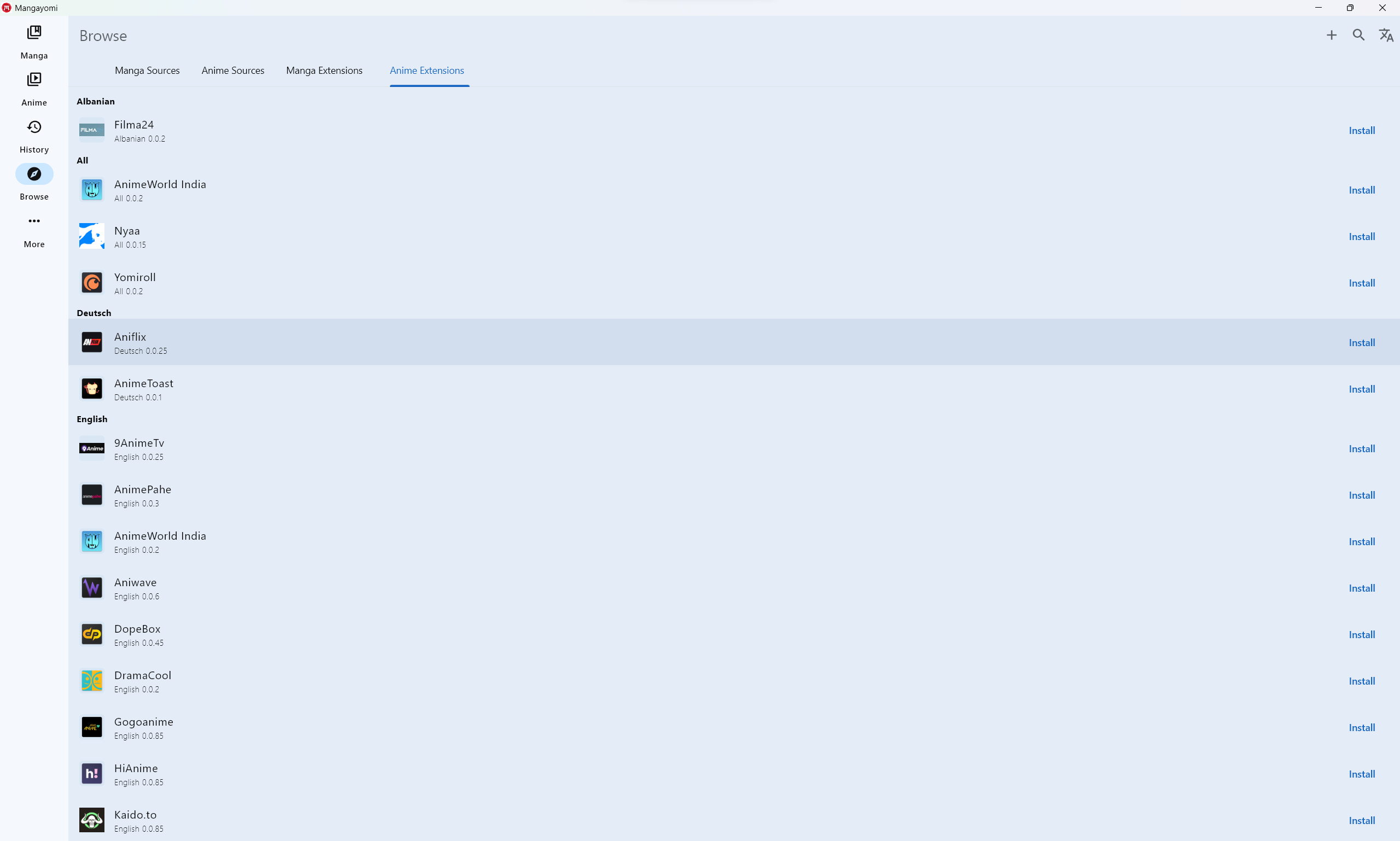
|
|
3. then click `+` and you will see :
|
|
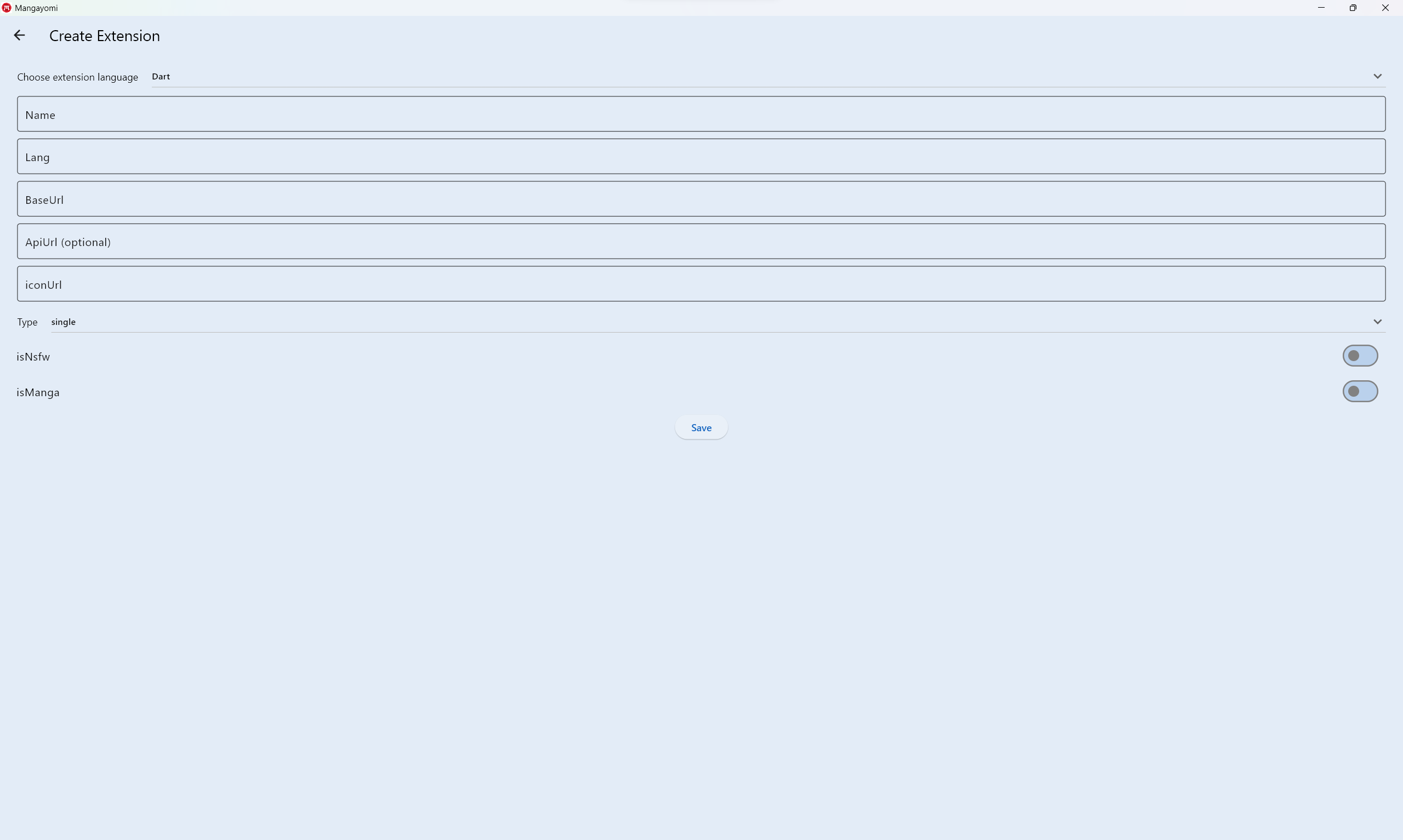
|
|
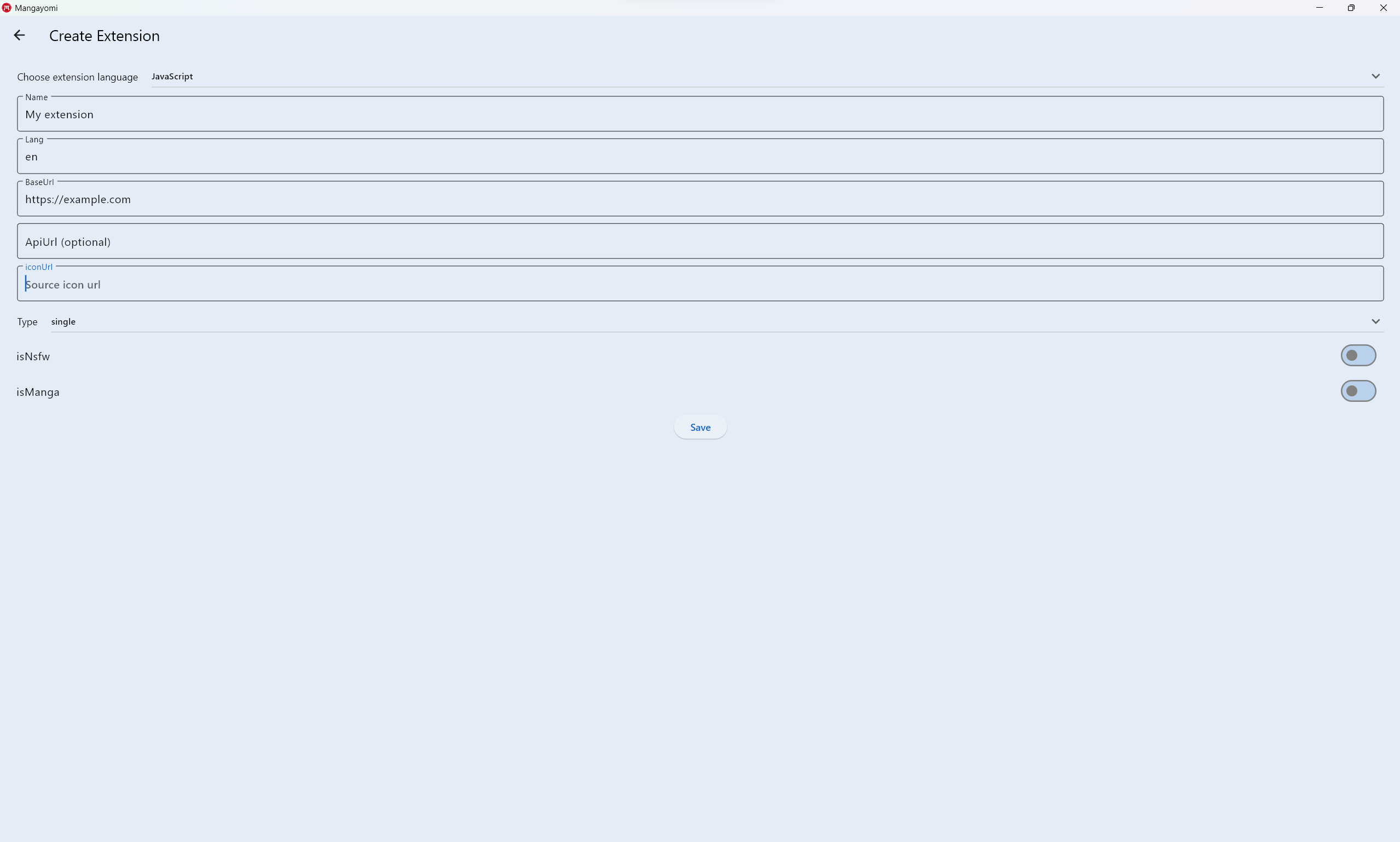
4. Fill in the fields with your new source that you would like to create,
|
|
|
|
NB: only the `ApiUrl` field is optional
|
|
then click on save
|
|
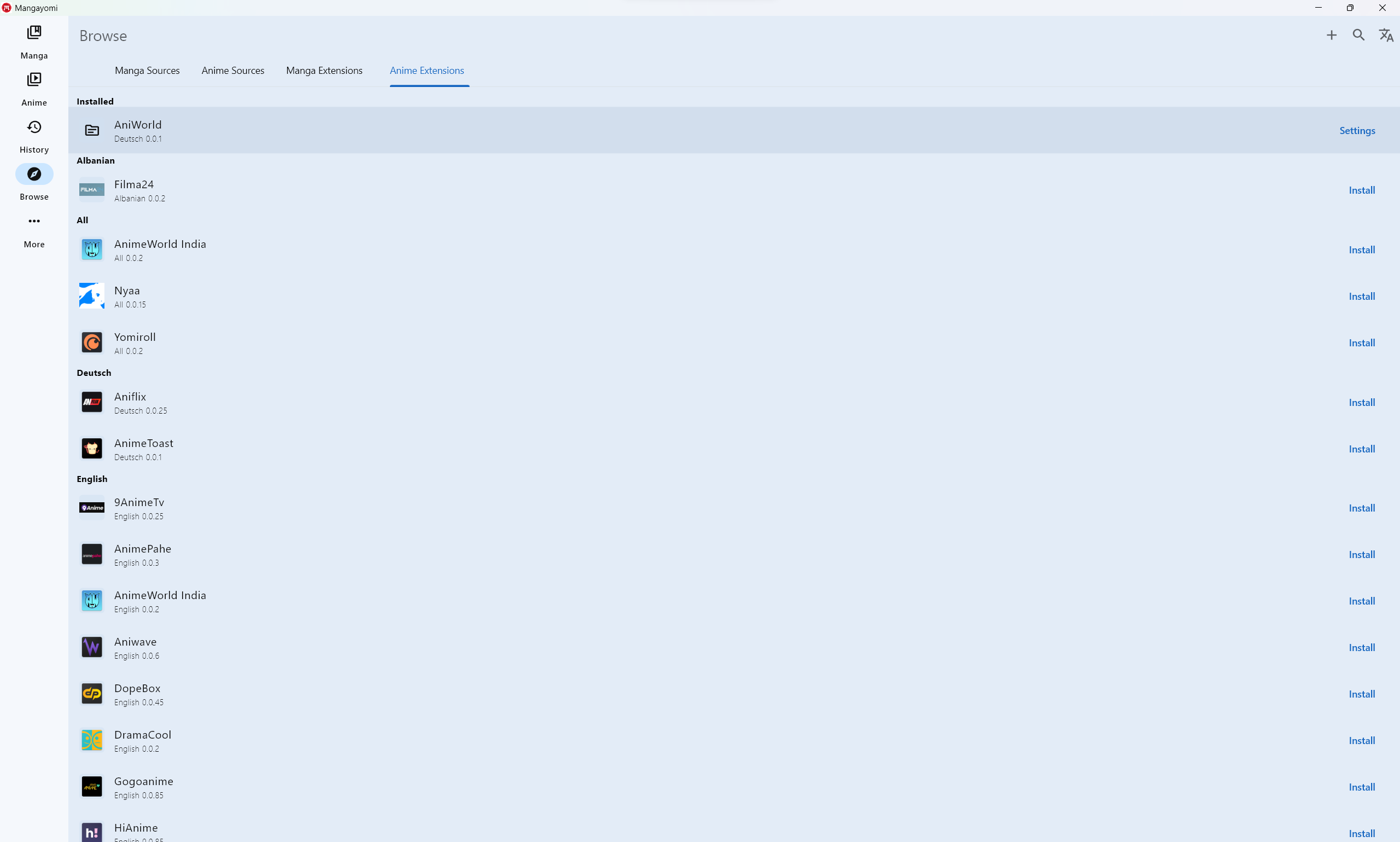
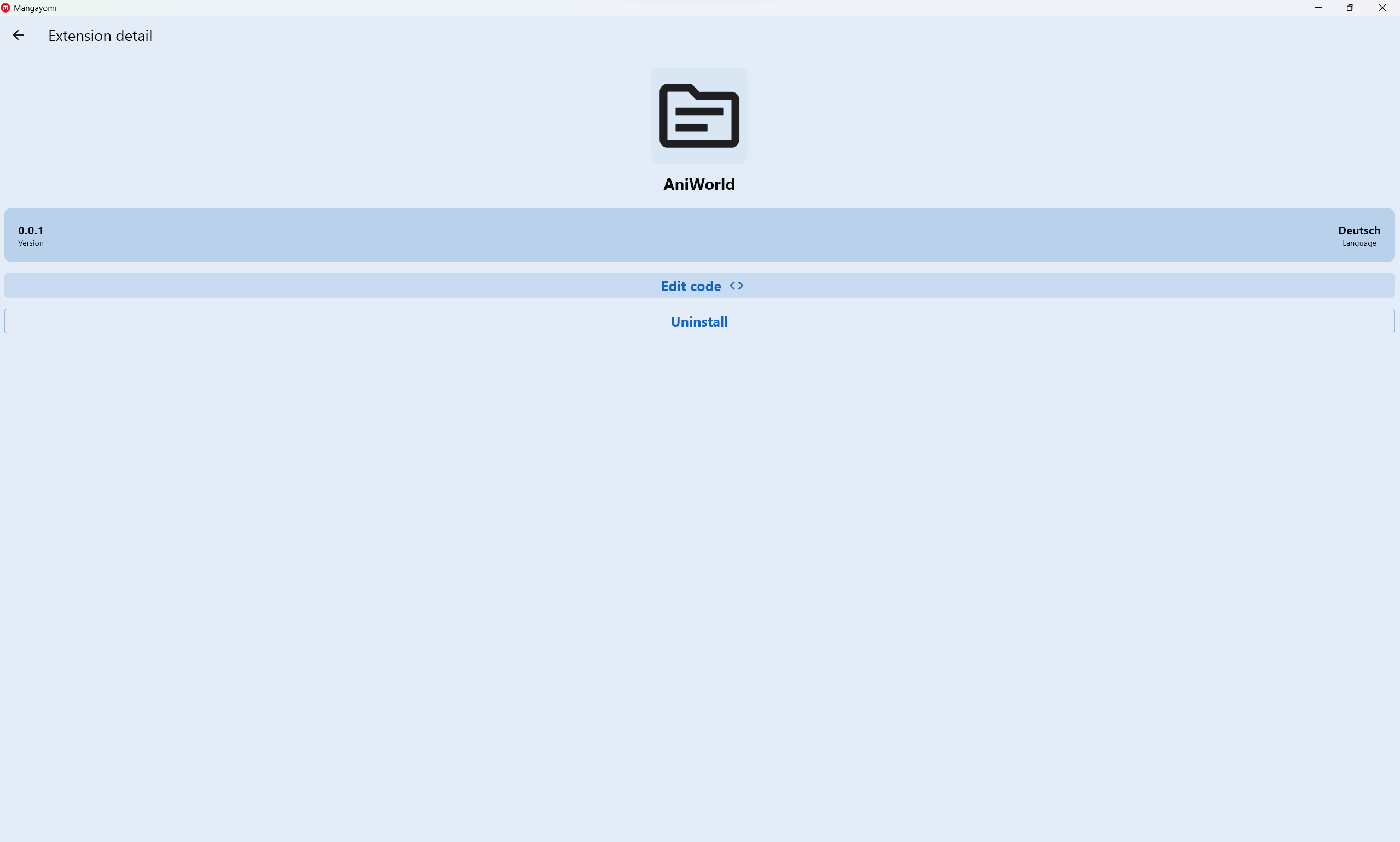
5. you will see your new source in the extension list
|
|
|
|
click to open settings
|
|
6. After click on edit code
|
|
|
|
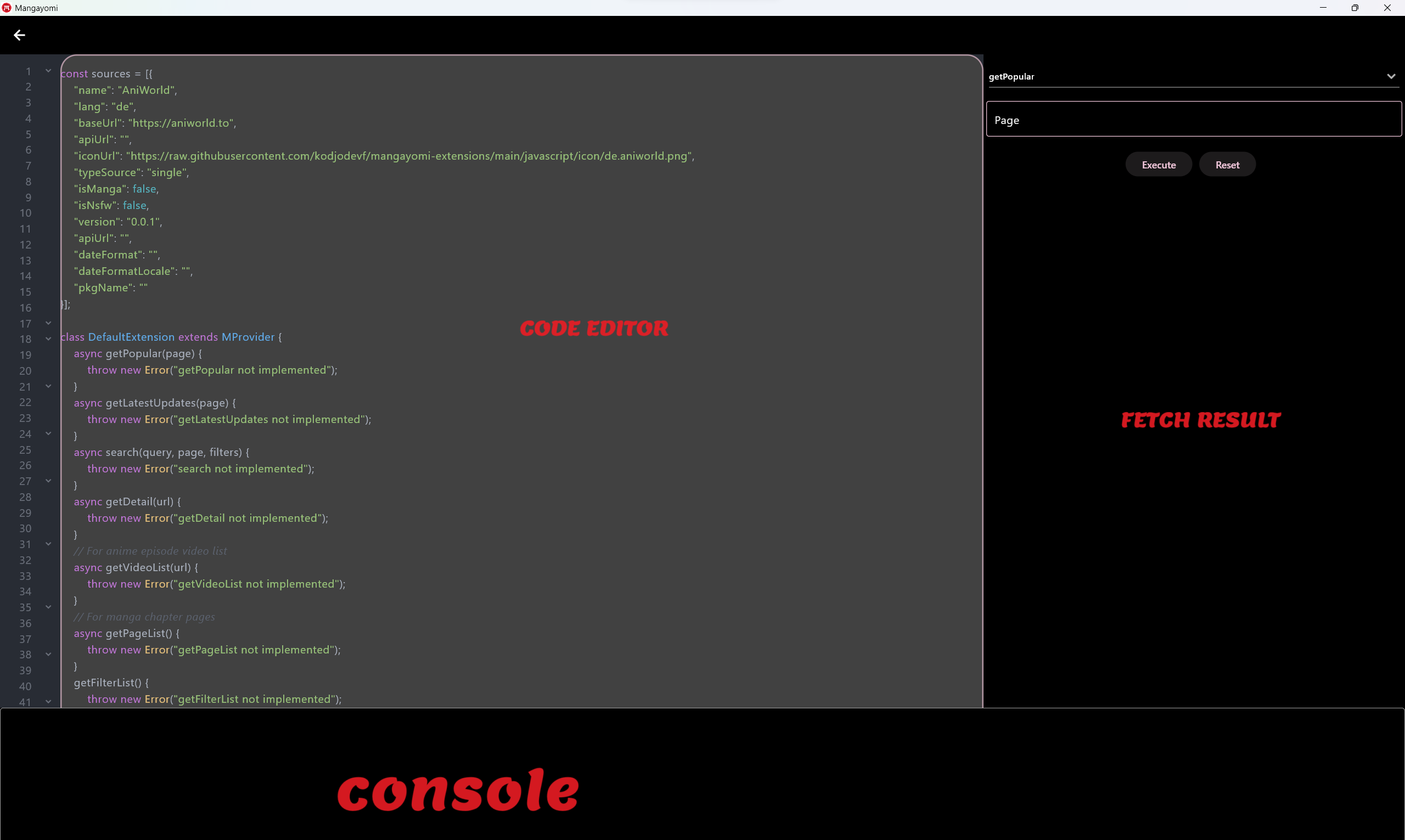
7. Finally you can now write the extension
|
|
|
|
- This page contains three parts:
|
|
- Code editor: where you will write your code
|
|
- Fecth result: where you will test the different implemented methods by having a result in the expected format
|
|
- Console: which will show you the logs
|
|
|
|
Once extension is ready you can relocate your code into `mangayomi-extension` project in a `src` or `multisrc` package and create a Pull Request.
|
|
|
|
### Source
|
|
|
|
| Field | Description |
|
|
| ----- | ----------- |
|
|
| `name` | Name displayed in the "Sources" tab in Mangayomi. |
|
|
| `baseUrl` | Base URL of the source without any trailing slashes. |
|
|
| `apiUrl` | (Optional, defaults is empty) Api URL of the source with trailing slashes. |
|
|
| `lang` | An ISO 639-1 compliant language code (two letters in lower case in most cases, but can also include the country/dialect part by using a simple dash character). |
|
|
| `id` | Identifier of your source, automatically set in `Source`. It should only be manually overriden if you need to copy an existing autogenerated ID. |
|
|
| `isManga` | (Optional, defaults to `true`) specify source type (false for anime and true for manga)|
|
|
| `dateFormat` | (Optional, defaults is empty) |
|
|
| `iconUrl` | The extension icon URL |
|
|
| `version` | The extension version code. This must be incremented with any change to the code. |
|
|
| `dateFormatLocale` | (Optional, defaults is empty) |
|
|
| `isNsfw` | (Optional, defaults to `false`) Flag to indicate that a source contains NSFW content. |
|
|
|
|
### Extension call flow
|
|
|
|
#### Popular manga
|
|
|
|
a.k.a. the Browse source entry point in the app (invoked by tapping on the source name).
|
|
|
|
- The app calls `getPopular` which should return a JSON
|
|
```bash
|
|
{
|
|
'list': array of {'url':string,'name':string,'link':string},
|
|
hasNextPage: Boolean
|
|
}
|
|
```
|
|
- This method supports pagination. When user scrolls the manga list and more results must be fetched, the app calls it again with increasing `page` values(starting with `page=1`). This continues while `hasNextPage` is passed as `true` and `list` is not empty.
|
|
|
|
#### Latest manga
|
|
|
|
a.k.a. the Latest source entry point in the app (invoked by tapping on the "Latest" button beside the source name).
|
|
|
|
- Similar to popular manga, but should be fetching the latest entries from a source.
|
|
|
|
#### Search manga
|
|
|
|
- When the user searches inside the app, `search` will be called and the rest of the flow is similar to what happens with `getPopular`.
|
|
- `getFilterList` will be called to get all filters and filter types.
|
|
|
|
|
|
#### Manga Details
|
|
|
|
- When user taps on an manga, `getDetail` will be called and the results will be cached.
|
|
- `getDetail` is called to update an manga's details from when it was initialized earlier.
|
|
- `title` is a string containing title.
|
|
- `description` is a string containing description.
|
|
- `author` is a string containing author.
|
|
- `genre` contain array of all genres.
|
|
- `status` is an "integer" value.
|
|
You can refer to this example to see the correspondence:
|
|
```bash
|
|
0=>"ongoing", 1=>"complete", 2=>"hiatus", 3=>"canceled", 4=>"publishingFinished", 5=>unknow
|
|
```
|
|
|
|
- `chapters` or `episodes` contain all of all manga chapters or anime episodes.
|
|
- `name` is a string containing a chapter name.
|
|
- `url` is a string containing a chapter url.
|
|
- `scanlator` is a string containing a chapter scanlator.
|
|
- `dateUpload` is a string containing date **expressed in millisecondsSinceEpoch**.
|
|
- If you don't pass `dateUpload` and leave it null, the app will use the default date instead, but it's recommended to always fill it if it's available.
|
|
|
|
#### Chapter pages
|
|
|
|
- When user opens an chapter, `getPageList` will be called and it will return an array of string that are used by the reader.
|
|
|
|
#### Episode Videos
|
|
|
|
- When user opens an episode, `getVideoList` will be called and it will return a
|
|
```bash
|
|
array of {'url':string,'originalUrl':string,'quality':string}
|
|
```
|
|
|
|
that are used by the player.
|
|
|
|
## Example sources that can help you understand how to create your source
|
|
|
|
- [Example](https://github.com/kodjodevf/mangayomi-extensions/blob/main/javascript/anime/src/de/aniworld.js)
|
|
of HTML parsing using HTML DOM selector.
|
|
- [Example](https://github.com/kodjodevf/mangayomi-extensions/blob/main/javascript/anime/src/en/allanime.js)
|
|
of Json API usage.
|
|
|
|
|
|
## Some functions already available and usable
|
|
|
|
|
|
### http client
|
|
|
|
Return Response
|
|
```bash
|
|
- Simple request
|
|
|
|
const client = new Client();
|
|
|
|
const res = await client.get("http://example.com");
|
|
|
|
console.log(res.body);
|
|
|
|
- With headers
|
|
|
|
const client = new Client();
|
|
|
|
const res = await client.get("http://example.com",{"Referer": "http://example.com"});
|
|
|
|
console.log(res.body);
|
|
|
|
- With body
|
|
|
|
const client = new Client();
|
|
|
|
const res = await client.post("http://example.com",{"Referer": "http://example.com"},{'name':'test'});
|
|
|
|
console.log(res.body);
|
|
|
|
```
|
|
|
|
### HTML DOM selector
|
|
|
|
Example:
|
|
```bash
|
|
const htmlString = `
|
|
<html lang="en">
|
|
<body>
|
|
<div><a href='https://github.com/kodjodevf'>author</a></div>
|
|
<div class="head">div head</div>
|
|
<div class="container">
|
|
<table>
|
|
<tbody>
|
|
<tr>
|
|
<td id="td1" class="first1">1</td>
|
|
<td id="td2" class="first1">2</td>
|
|
<td id="td3" class="first2">3</td>
|
|
<td id="td4" class="first2 form">4</td>
|
|
<td id="td5" class="second1">one</td>
|
|
<td id="td6" class="second1">two</td>
|
|
<td id="td7" class="second2">three</td>
|
|
<td id="td8" class="second2">four</td>
|
|
</tr>
|
|
</tbody>
|
|
</table>
|
|
</div>
|
|
<div class="end">end</div>
|
|
</body>
|
|
</html>`
|
|
|
|
const document = new Document(htmlString);
|
|
console.log(document.selectFirst("a").attr("href")); // https://github.com/kodjodevf
|
|
console.log(document.selectFirst("td").text); // 1
|
|
|
|
```
|
|
See [`dom_selector`](https://github.com/kodjodevf/mangayomi/blob/main/lib/eval/javascript/dom_selector.dart) to see available methods.
|
|
|
|
|
|
### String utils
|
|
- this.substringAfter(`string: pattern`)
|
|
- this.substringAfterLast(`string: pattern`)
|
|
- this.substringBefore(`string: pattern`)
|
|
- this.substringBeforeLast(`string: pattern`)
|
|
- this.substringBetween(`string: left`, `string: right`)
|
|
|
|
### Crypto utils
|
|
- unpackJs(`string: code`);
|
|
- deobfuscateJsPassword(`string: inputString`)
|
|
- encryptAESCryptoJS(`string: plainText`, `string: passphrase`)
|
|
- decryptAESCryptoJS(`string: encrypted`, `string: passphrase`)
|
|
- cryptoHandler(`string: text`, `string: iv`, `string: secretKeyString`, `Boolean: encrypt`)
|
|
|
|
## Help
|
|
|
|
If you need a help or have some questions, ask a community in our [Discord server](https://discord.com/invite/EjfBuYahsP).
|